Posts

Showing posts with the label oms - marketing and content

Make the impact your listing deserves with Full HD photos

Image
We know that in real estate, listing photos are worth more than a 1000 words and that is why we have tweaked the OMS to support Full HD photos. The OMS will now be able to support full HD resolution photos , in pixel terms that mean a whopping 1920 x 1080 pixels! That is an impressive 87% larger than our previous format. Now if you thought that was the best part, you’d be wrong because all of this is free of charge to our clients, and the larger size doesn’t mean that you will be limited either! You will still be able to upload an unlimited amount of photos to a listing! Your beautiful full HD photos will be displayed on your Entegral Flex responsive website and all other portals that support full HD format photos in all its glory!
#OMS_QuickTip - Custom banners on property brochures

Image
Did you know you can add optional custom banner text on your property brochures in the OMS? Simply enter a short custom phrase such “Sold by us!” or “Price Reduced” into the text box and it will be placed on your selected brochure. This functionality can also be implemented on custom brochures!                             On custom brochures the banner can be placed over photos or anywhere else, including a custom background colour On standard brochures this will be placed over photos as per examples above Remember that we can also design a custom property brochure for you - simply contact us today for a quote!

#OMS_QuickTips: Kick up your productivity with these OMS features

Image
Being a real estate agent is no easy task - in most cases you are juggling multiple listings, buyers and sellers all of which require reams paperwork and a fair amount of time. Some days it feels like you are never going to get ahead - but with these three OMS features , used to its fullest potential, your days could become just a little less hectic. Plan Ahead Start the day with a clear path of what is happening and everything else will fall into place. The calendar feature in the OMS is three calendars rolled into one! It allows you to see your personal calendar, a shared office calendar and a shared group calendar for multiple offices and agents. Tip: Block out a certain amount of time for each task and do the most important ones first. This means unexpected tasks won’t cause a panic because you got everything under control - like a real estate superhero. Communication is Key All estate agents would like to notify potential buyers about a new property on the market as quickly as po...

Reaching your target audience

Image
If your online marketing strategy does not contain Google AdWords as a component, now is the time you should take advantage! If you are not familiar with Google AdWords, it is essentially a pay-per-click marketing service which allows carefully created advertisements to reach the right audience, directing them to your website. Here are a few reasons why you should be using AdWords for your real estate website: Measurable and Flexible: With traditional advertising such as print, you cannot measure the impact as precisely as you can with AdWords - with our Search Engine Marketing we set up keywords, daily budgets, cost per click and other important settings to deliver maximum results for you. We also send you a monthly report detailing your advertisement performance and do tweaks to increase the click-through-rate and leads conversion. Brand Awareness:  Due to the tailored nature of AdWords, even when visitors do not click on your advertisement you are doing valuable brand building...

#OMS_QuickTips: Share your knowledge with news and advice

Image
Having your own Entegral powered  real estate website is more than just about ensuring that your latest listings are uploaded - it also offers you the opportunity to share your real estate knowledge and information about the areas you operate in. Not only will the original content on your website help with your SEO, it will also add to the overall user experience for visitors. Not sure where to start? We suggest writing neighbourhood profiles - you can find tips on how to do this from this article on our Company Blog It is really easy to load your news onto the OMS - Here is the help file you can use that explains the process in a few easy steps: Add news to your website

News & content editor Internet Explorer 11 issue fixed

Image
We corrected a problem where the toolbar in the content & news editor was disabled if you used the latest Internet Explorer 11. News articles can be loaded (and pre-scheduled) to appear on your website if you host your real estate website through us.

Improved news articles editing with thumbnails

Image
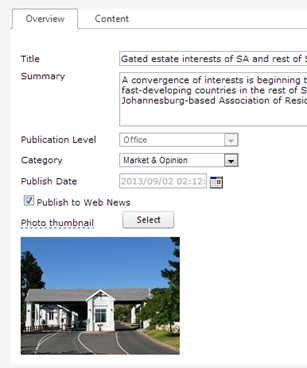
We’ve improved the layout of articles editing in the OMS with key fields including title and summary in one tab, and the content in another tab. A new thumbnail feature was also added that allows you to upload a thumbnail image to your news articles as shown below. The system will automatically resize your photo. Thumbnails can be integrated on news articles for websites hosted by Entegral. It is free of charge for template websites while custom websites will carry a small upgrade fee. Here is a sample of how this thumbnail feature looks on MyProperty’s featured property news articles:

New OMS website subscriptions report

Image
You can now view your website property email alert subscribers in the OMS. Go to the Marketing & Content Menu and click on ‘Subscriptions’. In the dropdown list options will be available if you have the correct office or group user profiles. You can also view the property search criteria for the subscriber by clicking on the ‘view’ link. If you don’t have the website property email alerts enabled for your website (hosted by Entegral) click here for more info and to order today .

Increased file size for website news

Image
The OMS Marketing & Content module has an external news section which provides functionality to load news for your website. Included is an image upload and document upload manager . The document upload manager can be used to upload files (pdf, txt etc) that is included as a hyperlink for visitors to download. We have increased the maximum file sizes for the document manager as follows: - 5MB files for offices. - 10MB files for national websites. To upload a document first enter the text for the download e.g. ‘download file’. Highlight the text and click on the document manager and select a file (or upload a new one).

OMS small updates on stock report and marketing module

Stock report: We corrected a problem on the new stock reports where the Stand Size was showing incorrectly in the Building Size column. Marketing module, news section: On the page where news items is listed, when the browser window was resized a lot smaller, the edit and view links in the news section became unreadable. We corrected this and made the columns fixed sizes.

Increase file upload size for documents in news manager

Image
We've increased the maximum allowed upload size for documents in the document manager for the news component. You can now upload documents (to be displayed as downloadable hyperlinks on your website) to just under 2MB (1910kb to be exact). About the OMS news content editor: The OMS news editor (available through the Marketing & Content menu / external news) allows you to load your own news articles to your website (if hosted by us). The built-in document manager allows you to upload files (e.g. PDF's) you want to make available as a downloadable file on the article.

Improved download library for OMS

Image
We've made available a much improved download library for our Enterprise (National/Group) clients. A 'new download library' link is available on the existing download library. We are busy transfering the files from the old to the new component. We will enable the new library tonight so all your offices/agents will be able to access the new component tomorrow. The improved download library makes it easier for file uploads, to create folder structures and to rename or remove files: More about the OMS Download Library: The download library is an integrated part of the OMS and allows sharing of files between offices and agents in a group. It is currently offered to our Enterprise/National clients.

Improved news editor

Image
We have loaded a new news manager on the OMS. The changes are mostly with the editor control and image manager which makes it a bit easier and faster to load and format news items and attach, resize and crop images.