Posts

Showing posts with the label oms - referrals

Street address now available on referral view

Image
When you open referrals from the referrals screen: the street address is now included if supplied: Referrals are available to our enterprise clients. It allows buyer, seller, landlord and tenant referrals to be captured and tracked between offices in a group.

View Referrals from email link – problem corrected

When a new referral is captured or the status is updated an email is automatically sent to both send and receiving offices. Clicking on the referral link on the email will open up the referral. There was a problem where a blank referral was shown due to the particular user not logged in. We have addressed the problem and the system will now force you to login to view the referral if not already logged in. Note: the referral system module is only available to national clients

OMS contacts calendar issue corrected

Image
Some user experienced an issue where they couldn’t save the birth date on a contact (through either the contacts, property or referral modules). The problem was corrected over the weekend.

OMS Referral module – View enhancements

Image
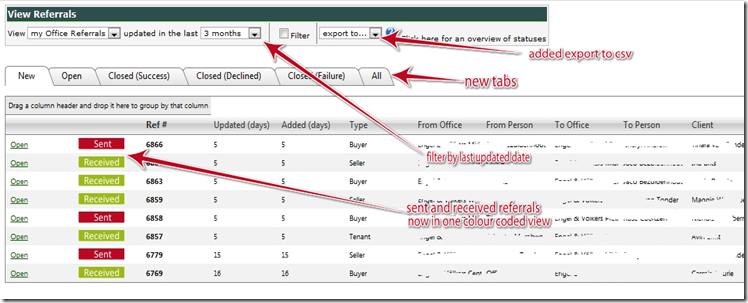
We’ve enhanced the Referral module default view screen to be more user friendly and added one or two new features: 1. Sent and Received referrals are now visible in one view (previously a dropdown selection) and is colour coded to show you sent or received referrals. 2. Referral Statuses are now separated by tabs (new, open, etc). This makes it easier to view referrals based on status. The ‘All’ tab is a consolidated view which shows all referrals. 3. A ‘updated in the last’ view was added to filter for referrals updated in the last x months. Previously all referrals were shown. 4. The export function was changed to a dropdown list and we’ve added export to CSV as an option to the existing Microsoft Word & Excel exports. The Referral Module is available to Enterprise (National) clients as part of the OMS , or as a separate system .

OMS referral module new referral types

Image
We have added 2 new referral types to the referrals module: 1. Tenant referral 2. Landlord referral The capture screens are similar to the existing buyer and seller referrals. We are currently tweaking the ‘view referrals’ screen, the update should become available in the next 48 hours. The OMS Referrals module is available to enterprise clients (national groups) or as a standalone web application for any real estate group.

OMS Referrals: filters tweak

Image
After recent updates that added extra columns on the referrals view screen, the filter buttons became hidden except on large screen resolutions. Here we’ve enabled filters but cannot see the buttons: After the update, filter buttons now (more) visible: Note: the OMS referral system is only available to enterprise clients and allows referrals to be tracked between offices. Watch out for more updates to follow this month.

OMS Referral system bug fix: close referrals

We’ve corrected a problem where you couldn’t close an open referral sent to you as ‘successful’. This happened on some user accounts. We are currently busy with upgrades on the referral system which will be rolled out over the course of the next few weeks. Watch this blog for updates. about the referral system : the referral system allows buyer and seller referrals to be sent between offices in an organisation and is available not multi-office / national groups.

OMS improved contacts editing

Image
We’ve improved the contacts screen with improved screen layout and new functionality. Here is the new layout: 1) contact details: all the key contact details of person including ‘active’ checkbox to enable/disable a contact from the contacts module view 2) personal details: more personal details from the contact that you won’t use on a regular basis. You can view it by pressing the expand icon (7) 3) categories & sharing: select which categories this contact belongs to. We’ve made it a bit easier to understand, by moving the ‘is shared with office’ checkbox here. Once you click the checkbox the office categories will appear. 4) notes: you can now capture multiple notes per contact. You can also add a date, which is great if you want to do some sort of activity tracking on a contact. 5) linked properties: you can now see the properties linked to this contact. Especially usefull if you open seller details from the contacts module, as a link to the property will b...

OMS - Referral contacts now linked to contacts module

Image
[note: this feature is only available to enterprise clients] This new feature gives you quick access to your referral contacts captured or received (where you have accepted). When you capture a new buyer or seller referral in the Referrals Module, the contact details will be linked to a new ‘referrals’ auto-generated category in the contacts module. The referral contact is automatically linked to the sending user’s referral contacts. Once you accept a referral, the referral contact will also show in the accepting user’s referral contact list in the contacts module.   Office Administrators/Managers have access to all referral contacts through the ‘office’ category. Referral contacts cannot be deleted from here, since they are linked to referrals.

OMS seller referrals – areas corrected

Image
When capturing a new seller referral the town/suburbs sometimes didn’t want to load. We’ve corrected the issue.

OMS Referrals new days since update/create columns added

Image
The days column in the view referrals section now have 2 days columns: days since updated, and days since created. This allows for better tracking of referrals. The OMS Referrals module is included to all Enterprise (National) clients and allows paperless referrals tracking in an organisation.

OMS referrals export adjustment

Image
The referrals module (available to enterprise clients) allows inter-office referral tracking within a group. The export to Excel/Word functions have been adjusted to export all referrals and not just those in the current page.

Referrals & Operational areas updates

Image
Extra validation was inserted into the referral module - the system will now check that at least one contact number is entered before proceeding. The referral module is currently offered integrated into the OMS for our Enterprise clients. We've updated the opertional areas section under setup to allow for a all suburbs selection. This is usefull if you operate in all suburbs in a specific town. Operational areas are used in various parts of the OMS and client websites although it will mostly be used for future features in the OMS.

Automatic removal of draft referrals

Draft referrals are now automatically removed from the system once a day. About the referral module: The referral module in the OMS allows inter-office referrals on a national basis for a group. Some of our top clients have thousands of active referrals (tracked by status) in the referrals module.