Posts

Showing posts with the label oms - dashboard

New Sole Mandate Banners for Flex Websites

Image
We've added  Sole Mandate Banners  to our first generation  Flex Websites - this update ensures that if you have selected sole mandate on your OMS or your  Base  dashboard when uploading a new listing it will display accordingly on your Flex website as well. This banner will not only appear on the search results pages of your website but also on the details page of a listing with a sole mandate. Examples of results page banner Examples of listing page banner

Make the impact your listing deserves with Full HD photos

Image
We know that in real estate, listing photos are worth more than a 1000 words and that is why we have tweaked the OMS to support Full HD photos. The OMS will now be able to support full HD resolution photos , in pixel terms that mean a whopping 1920 x 1080 pixels! That is an impressive 87% larger than our previous format. Now if you thought that was the best part, you’d be wrong because all of this is free of charge to our clients, and the larger size doesn’t mean that you will be limited either! You will still be able to upload an unlimited amount of photos to a listing! Your beautiful full HD photos will be displayed on your Entegral Flex responsive website and all other portals that support full HD format photos in all its glory!

New Flex updates allow for more additional information on listings

Image
You have asked for it and our developers have delivered with the latest round of updates! You will now be able to display even more of a properties features on a listing, as you can see in the example below. The extra additional information will be displayed underneath your property description and can be added from the OMS dashboard. The information will be displayed on your Entegral responsive Flex website , as well as Property24. Contact us today to upgrade your older version Entegral website to a responsive Flex website or to update your existing Flex website.

#OMSQuickTips: quickly search for contacts or properties in the OMS

Image
The OMS quicksearch is a powerful search tool that allows you to quickly locate current or historic property listings or contacts. Simply enter your search criteria (you can enter partial information of at least 3 characters) and hit either properties or contacts . Results are displayed almost instantly. You can search on: Property reference numbers Loan account numbers Street names Complex names Erf numbers First names Last names Email addresses Mobile numbers Home numbers Office numbers And when you are on the road, you can always use OMS.mobi to quickly find contacts or properties. We've also loaded a small update on the search - the help popup blocked the search on very small screens.

Centralize your external property leads with the OMS

Image
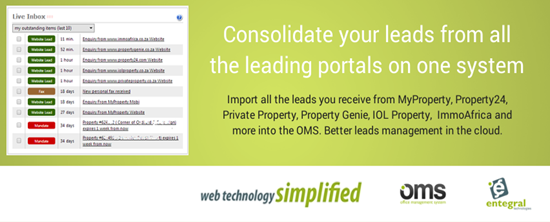
Did you know you can centralize your property leads from external portals into the OMS? Leads from ImmoAfrica, Property24, Private Property, IOL Property, MyProperty and your own website will show up in your OMS inbox. From here you can open the lead for the details and even click on the hyperlinks to open the listing on the external website or direct in the OMS. This feature works for all listings loaded through the OMS and exported to these portals although you would need to manually set it up. To get started and for help, log in to the OMS and click on “Import leads from external property portals” for instructions. There is no additional cost to use this feature, it is included standard for all OMS accounts for all listings exported to external portals through the online marketing section:

New quick search by Erf No and other OMS updates

Image
You can now also use the OMS quick search to search for properties by Erf Number. Simply enter the erf number (or partial erf number) and hit ‘properties’ to find matches:   We’ve also applied the following updates: 1. We corrected a problem where agents deleted or disabled weren’t always removed from external websites. 2. We corrected a problem on the On Show stock report where it showed duplicate listings when a listing had multiple show dates. Small alignment tweaks were also applied to the report.

All the leads from all the leading property portals in one place

Image
We’ve made it super easy to list your properties once and export it automatically to all the leading property portals. Now we’ve developed innovative new functionality that will allow you to import all those leads back into the OMS. Automatic. No manual capturing. The new feature will allow you to import your leads from IOL Property, Property24, Private Property, Property Genie, ImmoAfrica to complement the leads already imported from MyProperty and your own website. The service is live and we will post instructions to this BETA service within the next 24 hrs next to your OMS inbox. Leads are imported on average within 5 minutes. You will have the option of manually importing leads or use an automatic option that is easy to configure. More portals will be added over time. This is how your imported leads will look like: Opening an imported lead will show all the contact information you normally receive with the benefit of hyperlinks to your OMS property and a link to the property on the...

OMS upgrades including new online marketing view

Image
  1. New flat user interface Tweaks were done to create a more consistent and cleaner user interface throughout the system:   2. Improved online marketing page with status and links to external portals You can now view the status of your property listing on external portals presented by different icons as illustrated below. Should there be an error (e.g. the Private Property icon below) you can hover your mouse over the icon to get an icon description. Reference numbers with links are also included next to the portals to quickly locate the listing. Where you see a ‘denied’ sign your listing does not appear on that website (where in most cases you don’t have a contract with them).   When you load a new listing and shortly after you’ve listed it, it will show a pending orange icon as illustrated below until the system picks up that it is listed:     3. Quicker area and agent selection You can now type in an area/agent in a dropdown box to locate the...

OMS Calendar appointments now with more time selections

Image
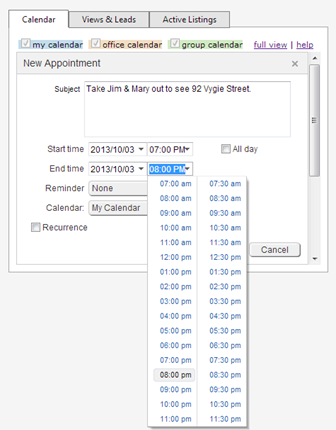
Agents work longer hours and some events need to be scheduled outside normal business hours. The OMS Calendar now supports selecting times from 7am to 11.30pm in the dropdown list. Before you had to enter time time manually if it was after 5pm: The OMS features x3 calendars that are colour coded for easy identification: 1) My Calendar : personal appointments only you can see. 2) Office Calendar : events everyone in your office can see. 3) Group Calendar : events everyone in your group of offices can see. Only managers and administrator with the correct user rights can load office and group calendar items. You can setup reminders that will show once you log in to the OMS and also set recurring events (e.g. weekly office meetings).

Overview of the auto listing expiry, notifications & reports in the OMS

Image
How does the auto-expiry work? The OMS automatically checks listings about to expire every day and notifies you through the Live Inbox. If you are the listing agent you will receive an alert 1 week before the listing expiry date. Office Managers/Administrators can also view mandates about to expire for the whole office. Simply click on the notification to open the listing, or click on the checkbox to action it as ‘read’. When the mandate expiry date is reached it will auto-expire the listing and remove it from websites: The expired property is still accessible from the advanced search menu and if you sign a new mandate you can easily re-enable it. There is also the expired listings reports in the ‘Quick Search’ on the OMS you can use to view expired stock for individual agents or the whole office: Under the stock reports you can also draw PDF style expired stock reports and define how you want to group and sort the report:

Property Views and Leads tracking adjustments

Image
We’ve made minor adjustments on the OMS property views & leads functionality that allows you to track property views & leads per agent, office and your organisation. Amongst this is an adjustment on some of the graphs so you can clearly see the dates (previously cut off):

New: open faxes directly from your email notification including phone

Image
The OMS fax notification message has been enhanced with a link that allows you to open the fax received (personal or office) from your email: We’ve also tested it on popular smartphones and you can open faxes directly from your phone when you click on the link. Here we’ve opened a 25-page contract: More about fax management in the OMS The OMS provides fax management in the cloud. It provides your office and all your agents with free unique fax numbers that are linked to your office document or personal document library. Faxes received are imported in a fax folder. From here you can drag-and-drop to other folders or rename: When a fax is received it automatically imports into the OMS dashboard inbox view too: The OMS fax-to-document library is included at no additional cost with all OMS packages. To get your fax number simply login to the OMS, click on the personal or office document library and instantly get a fax number at the click of a button.

OMS Dashboard Live Inbox enhancement

Image
The new default view for the OMS Live Inbox is now ‘ my outstanding items (last 10) ’. This filter for the last 10 outstanding items in your inbox. As you tick items of it will automatically filter again and bring older items into view. You can still click on the dropdown and select to view all your items (or historic completed items). As before all items are colour coded with the waiting time and description displayed: We have also corrected a problem where the inbox did not refresh correctly for all users. The inbox now refresh faster too – it will now check for new messages automatically every 60 seconds.

OMS login and search updates

Image
x2 Small updates have been done: IP ADDRESS On the login screen your public IP address is now displayed to assist with any support queries: The system will also now log this IP address in your Audit Trail (available under reports) for all users as indicated below: SEARCH Small performance and interface tweaks have been made for the OMS universal search. It now provides better visual feedback when a search is performed while search times have also been slightly improved:     The OMS search is universal , so you can search property reference numbers, street names, complex names as well as contact info like first name, last name, email address and telephone numbers. The results are fetched from the database and displayed to you very quickly and is sorted in the most recent listings or contacts first. The search also allows for partial searches , so you can enter the first 3 letters of your query and hit search. E.g. if you have listings in a complex called...

Sneak Preview: Improved OMS Dashboard to be launched

Image
For heritage day in South Africa we decided to put the OMS dashboard on the grill and server up an improved interface.   We are busy finalizing an improved OMS dashboard which will launch in the next day or two. Some of they key features will include: 1) Inbox – see and action new leads, referrals, property mandates expiring etc. 2) Quick detailed views graph. 3) Quick Active listings dashboard view including average days on market. We also slightly tweaked the calendar view. Keep an eye on our product blog or facebook page for the launch.

OMS: universal search enhancements, now also search contacts

Image
We’ve enhanced the new universal search with new features. You can now search property or contact records.  By adding contacts to the search you are now able to quickly find contacts without having to go to the contacts module first. PROPERTIES Search property reference number, loan account number, street name or complex name. This searches all your property listings and also office listings if you have rights. It will search all property statuses including for sale, rentals, auction, expired and inactive. CONTACTS Search first name, last name, email address, mobile number, home number or office number. This searches all your contacts including buyers, sellers, referrals etc. It will also search all office contacts if you have rights. It will also search all property transactions where you were linked as an agent e.g. if you were the listing agent on a home that was since sold, you can search on the seller name at that time, and it will find the person. Simply enter the ...

OMS: New universal search

Image
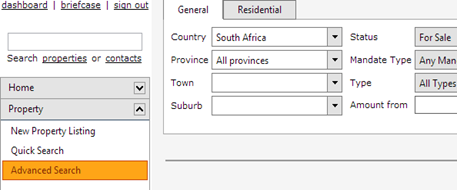
We have upgraded the search on the OMS to be more universal, you can now search on a number of items to find a property: - property reference number - loan account number (or part of it) - street name (or part of it) - complex name (or part of it) Depending on your rights, you will only be able to search your own listings or that of the office. In particular the following user accounts can only search on their own data: view access & personal access own data.

OMS Calendar enabled

Image
We have enabled the OMS Dashboard calendar again. The calendar was disabled after compatibility problems with the brand new cloud server environment. The issues have been resolved and the calendar is live again (with all calendar data). Read more about the calendar here .

OMS menu and field changes

Image
The top part of the OMS menu has been updated and the dashboard, briefcase and sign-out icons have been replaced with hyperlinks. The old icons were a bit confusing, especially for first time users: On all capture screens the edit field will now highlight in a light yellow colour when you are editing that field, which makes editing a bit easier:

OMS new personal and shared calendars

Image
The OMS now features a feature rich calendar on the home page dashboard. (This replaces the internal events calendar found under marketing & content). 3 calendars are available. They are colour coded to distinguish items in the view: 1. my calendar : entries you capture here are only visible and editable to you. 2. office calendar : these entries can only be edited by users with office admin rights, but the entries are visible to everyone in the office.  this is a handy shared calendar feature to communicate dates with everyone in the office. 3. group calendar : for national groups these calendar entries can only be edited by head office, but is visible to all offices and agents in the group. full calendar view : click on this link to open a larger version of the calendar. iCalendar export link: this is available in the full calendar view. It exports all your calendar entries to a generic iCalendar ICS format file. This can then be imported by most email progra...